Level 10

Stash

Stash uncommitted changes to clear your table, then bring them back when you are ready.

It is about time you peel back the vines and uncover the mysteries of Git's stash. Based on the noises your stomach is making, I must inform you that sadly this is not a snack stash. It will surely satisfy your hunger for knowledge though.

Step 1 of 8
0 xp

A drawer under the table

Remember, your working directory is like a tabletop where you lay out mementos before you glue them onto a page. Sometimes you are halfway through arranging when something urgent interrupts you.

The Git stash is like a drawer under the table where you can quickly place your in-progress arrangement without losing it. Inside, Git keeps a stack: each new arrangement you stash goes on top. When you are ready to continue, you take the top arrangement back out and put it on the table.

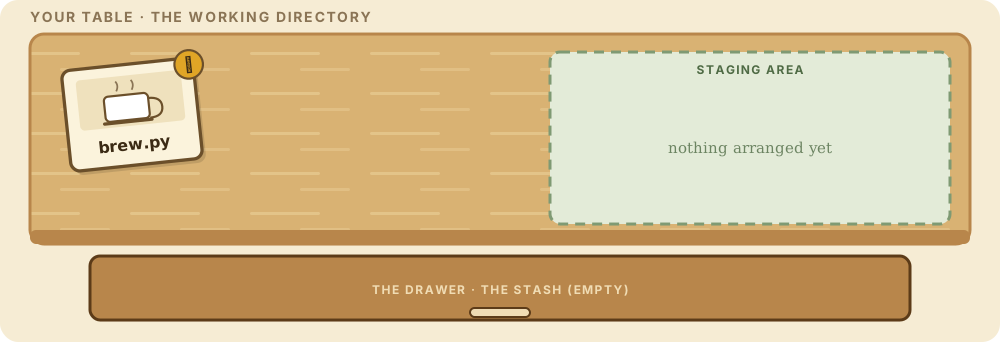
Something on the table

To try it, you need some changes on the table. You update brew.py again so it says:

print("Pour some more")

Normally you would stage the file and commit it onto a new page. BUT HOLD THE PHONE. You just got a frantic call from your crusty boss: drop your current work THIS INSTANT and make sure the previous version of brew.py is what is on the table. Because... well... grammar.

Do not throw it away

One option is to undo the edit by hand and type Chug coffee back in. But if this were a bigger change, you would not want to throw away all that work.

Instead, squirrel the memento on the table into the drawer, deal with the boss, and then bring your work back out. Git has a command for exactly that.

Into the drawer

Stash everything on the table:

Type this into the terminal below
git stash

Whoa. Your modified file left the working directory. brew.py says Chug coffee again and the wall is empty. Your work is not gone. It flew into the drawer as a stash entry holding the changes you made.

safe Stashes current changes; recoverable via git stash pop.

Named by position

Git names stash entries like this: stash@{x}. stash@{0} is the entry at the top of the stack, stash@{1} the one underneath, and so on. A stash entry stores a diff, the same kind you saw in Level 3: the differences between the stashed file and the version at the time it was stashed.

git stash list shows what is in the drawer without touching it.

Look in the drawer

Peek inside:

Type this into the terminal below
git stash list

One entry, taken from dev, recorded with the page it was taken from. Meanwhile, let's assume you took care of the boss's request. You are ready to pick up where you left off.

safe Stashes current changes; recoverable via git stash pop.

Getting it back

git stash pop takes the topmost arrangement out of the drawer and puts it back on your tabletop. Because the stash is a stack, the newest arrangement is the first to come back out. You can also pop a specific one by number, git stash pop 2, for the third from the top.

Other drawer tricks: git stash push <filename> tucks away just one file, git stash apply puts an arrangement back but leaves a copy in the drawer, and git stash drop throws one away entirely. Most of the time, stash to save and stash pop to retrieve is all you need.

Your turn: back onto the table

Boss handled. Which command puts your Pour some more edit back on the table and empties the drawer?

git-sim
Initial CommitDevlands

The graph appears here when the first command runs. The simulations are drawn by git-sim from a real repository.

The scrapbook · one picture for every Git idea

The scrapbook picture appears as the story is told.