Git commands
Force-pushing over a teammate, step by step, then undoing it
git push --force: rewriting history other people have
How to use this page
- sliderDrag it to move the graph from before the command to after it.
- ▶ / ❚❚Play or pause the command, start to finish, on a loop.
- Before · AfterJump straight to either end.
- ← → · spaceStep through a multi-step command; space toggles Before / After.
- APlay or pause from the keyboard (the page opens playing). Any manual input takes over.
- hoverA commit shows its message, author, date and parents, with its history highlighted.
- clickCopies the commit sha.
- ctrl + wheelZoom around the cursor (pinch on a trackpad). Double-click resets the view.
- EscStop playback, reset the view, close this menu.
- shareThe Share button copies a link to this graph, copies it as an image, downloads PNG/SVG/page, or posts it. #before, #after or #step=N in the link pins the state.
The Animated Git Cheat SheetFree · Customize it · Download it · Print it
git-sim visually simulates any Git command in your own repos - from your terminal, IDE, or AI.
Table of Contents
- Introduction
- What is git push --force?
- Watch it happen
- Before and after
- Why the check said "caution"
- Is it safe?
- How to undo it
- Try it on your repository
- Common questions
- Summary
- Next steps
- Related commands
Introduction
A normal git push refuses to move the remote branch anywhere that isn't a fast-forward. --force removes that refusal. Sometimes that's what you need: you rebased your own branch and the remote copy is stale. Sometimes it means someone else's commits vanish from the remote, and this page shows exactly that happening.
In this article, we'll:
- Watch
git push --forceoverwrite two commits a teammate had pushed - See why the pre-flight check rated it caution rather than destructive, and what that teaches
- Recover the lost commits, and look at the flag you should use instead
What is git push --force?
git push --force uploads your commits and tells the remote to point its branch at your tip regardless of where it was. If the remote's old tip isn't an ancestor of yours, the commits between them are no longer on the remote branch. The remote may keep the objects for a while, but nothing points at them, and git log on the remote won't show them.
Watch it happen
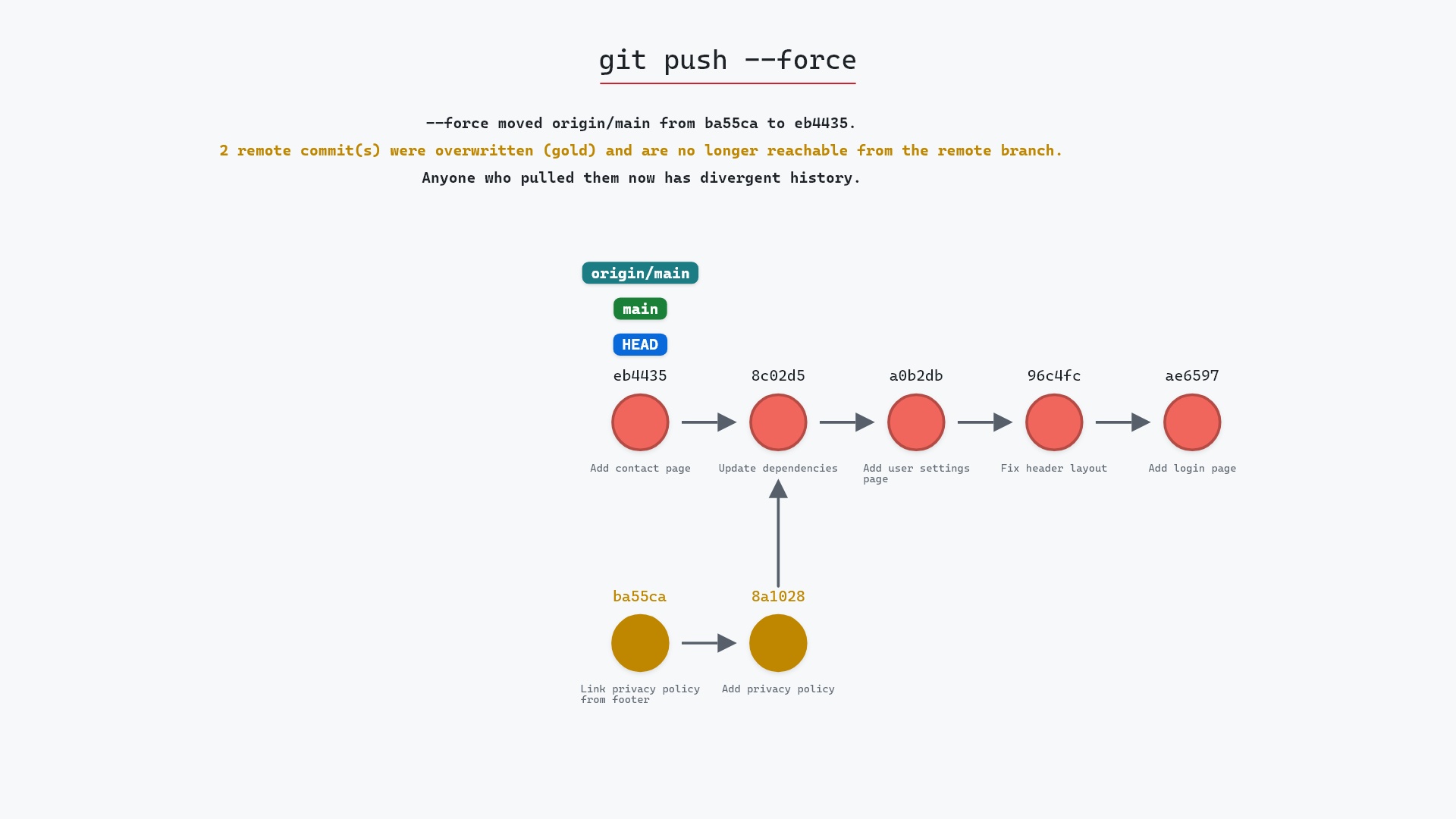
Our sample repo has one local commit to publish, while a teammate has pushed to origin since the last fetch. Here's git push --force:
- Before:
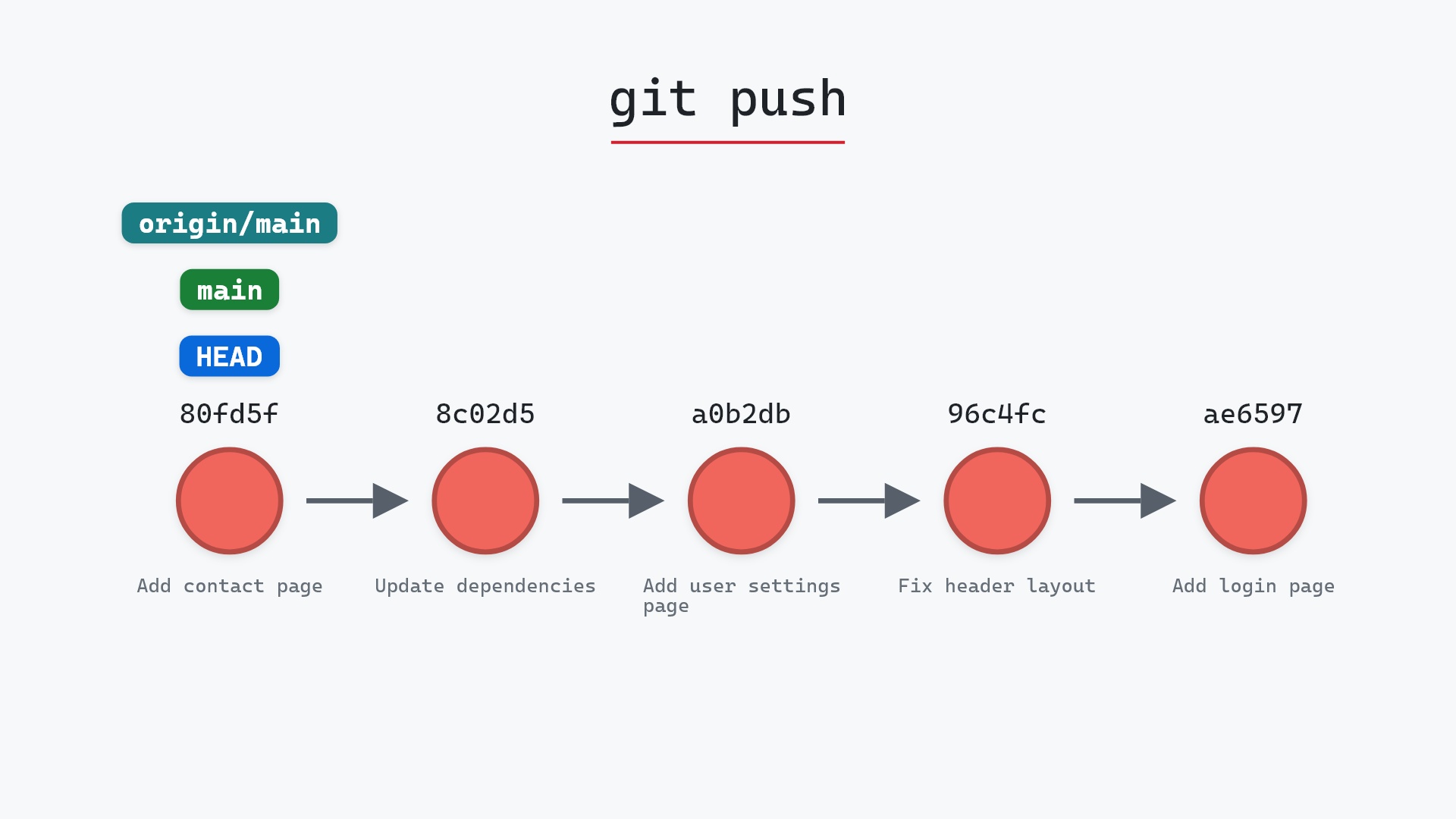
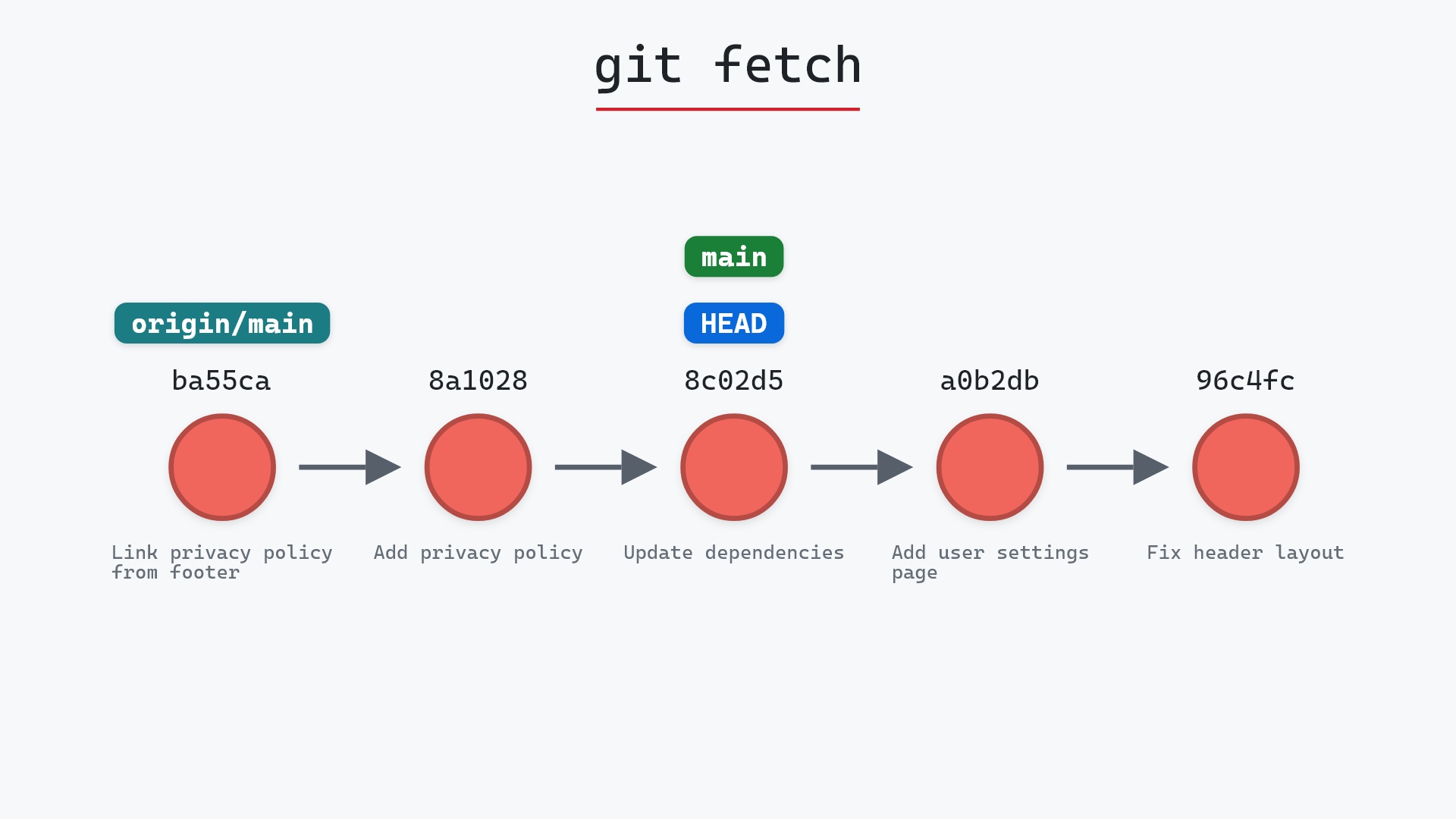
mainandHEADpoint at your rebased commit.origin/mainpoints at the teammate's tip as the remote has it now, two commits your clone had never fetched. - The remote's
mainis overwritten with your commit, soorigin/mainmoves to it. The teammate's two commits are no longer reachable from any branch on the remote. mainandHEADdon't move. Only the remote changed.
Before and after
Before the push, your clone believed origin/main was at 8c02d5b, one commit behind you. The remote had moved on without you knowing. After, the remote's main matches yours, and Git's output marks the update as forced:
The raw git output, if you want to read along in text
git log --oneline --graph --all
before
* eb4435d (HEAD -> main) Add contact page
* 8c02d5b (origin/main, origin/HEAD) Update dependencies
* a0b2db3 Add user settings page
| * 1117a34 (origin/feature, feature) Add search tests
| * e5869f0 Fix typo in search box
| * fc19889 Add search box
|/
* 96c4fc2 Fix header layout
* ae65976 Add login page
* 3e1ffe4 Add project skeleton
* 4114b2c Initial commit
after
* eb4435d (HEAD -> main, origin/main, origin/HEAD) Add contact page
* 8c02d5b Update dependencies
* a0b2db3 Add user settings page
| * 1117a34 (origin/feature, feature) Add search tests
| * e5869f0 Fix typo in search box
| * fc19889 Add search box
|/
* 96c4fc2 Fix header layout
* ae65976 Add login page
* 3e1ffe4 Add project skeleton
* 4114b2c Initial commit
what git printed
To ../your_project.git
 + ba55ca2...eb4435d main -> main (forced update)
Why the check said "caution"
Look at git-sim's report: "no remote-only commits as of last fetch, but remote may have moved since." From your machine, before a fetch, there's no way to know what the remote has now. The pre-flight is honest about that, and so is Git: a force push doesn't check either. That's the whole hazard. The only defense is fetching first, or using a flag that fetches the truth for you.
--force-with-lease that afternoon and have never typed plain --force to a shared branch since.
Is it safe?
Caution git-sim pre-flight
Force-push to origin/main; no remote-only commits as of last fetch, but remote may have moved since.
On a branch only you push to, a force push after a rebase is routine. On a shared branch it can discard other people's commits, and the person who finds out is them. That's why GitHub's protected branches block force pushes by default.
How to undo it
The teammate's commits still exist in their clone and, for a while, on the remote as unreferenced objects. From their clone:
git push --force origin ba55ca2:main
puts the remote back, after which you fetch and rebase onto it properly. If the remote is a hosting service, its own reflog or activity log usually shows the old tip too.
Try it on your repository
pip install git-sim
git-sim push --force
git-sim fetches into a temporary clone before simulating, so it shows the commits that would actually be overwritten, including ones you haven't fetched yet.
Common questions
What does git push --force do?
It moves the remote branch to your tip unconditionally, even if that drops commits the remote had. A + in front of a refspec, as in git push origin +main, forces just that one branch, as the git push documentation describes.
Is git push --force dangerous?
On a branch others push to, yes: it can remove their commits from the remote. On your own branch, after a rebase, it's the normal way to update the remote.
How do I undo a force push?
Anyone who still has the old tip (in their clone or reflog) can force push it back: git push --force origin <old-sha>:<branch>. Hosting services often keep the old tip too.
What should I use instead of git push --force?
git push --force-with-lease, which refuses if the remote has moved since your last fetch.
Summary
In this article, we watched git push --force overwrite two commits a teammate had pushed, saw why nothing on your side could warn you without a fetch, and covered how to recover and what to use instead.
Next steps
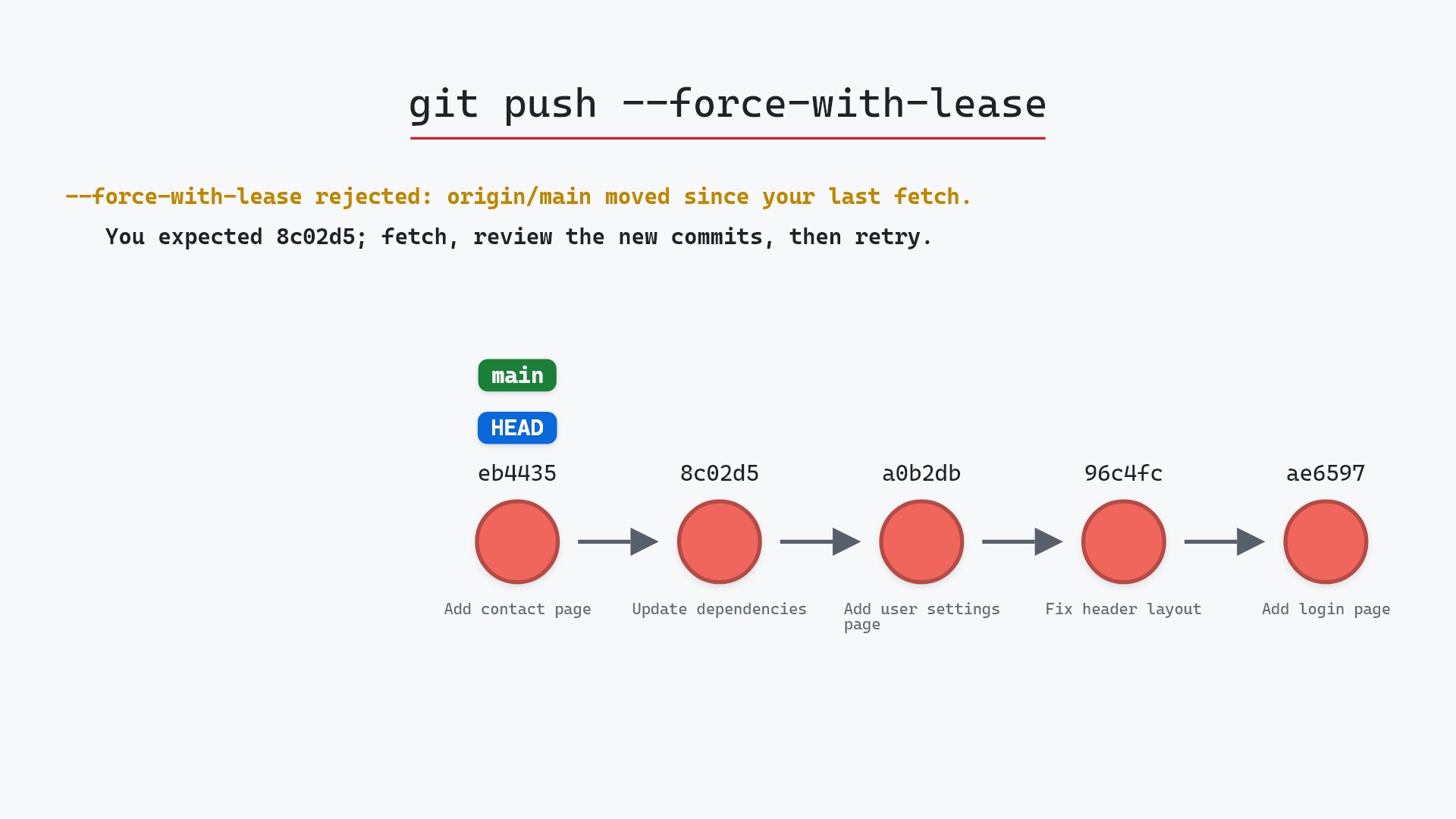
git push --force-with-lease shows the same situation ending in a refusal instead of a loss.
Related commands
- git push --force-with-lease, the safer version
- git push, the normal push and its check
- git fetch, what you should have run first
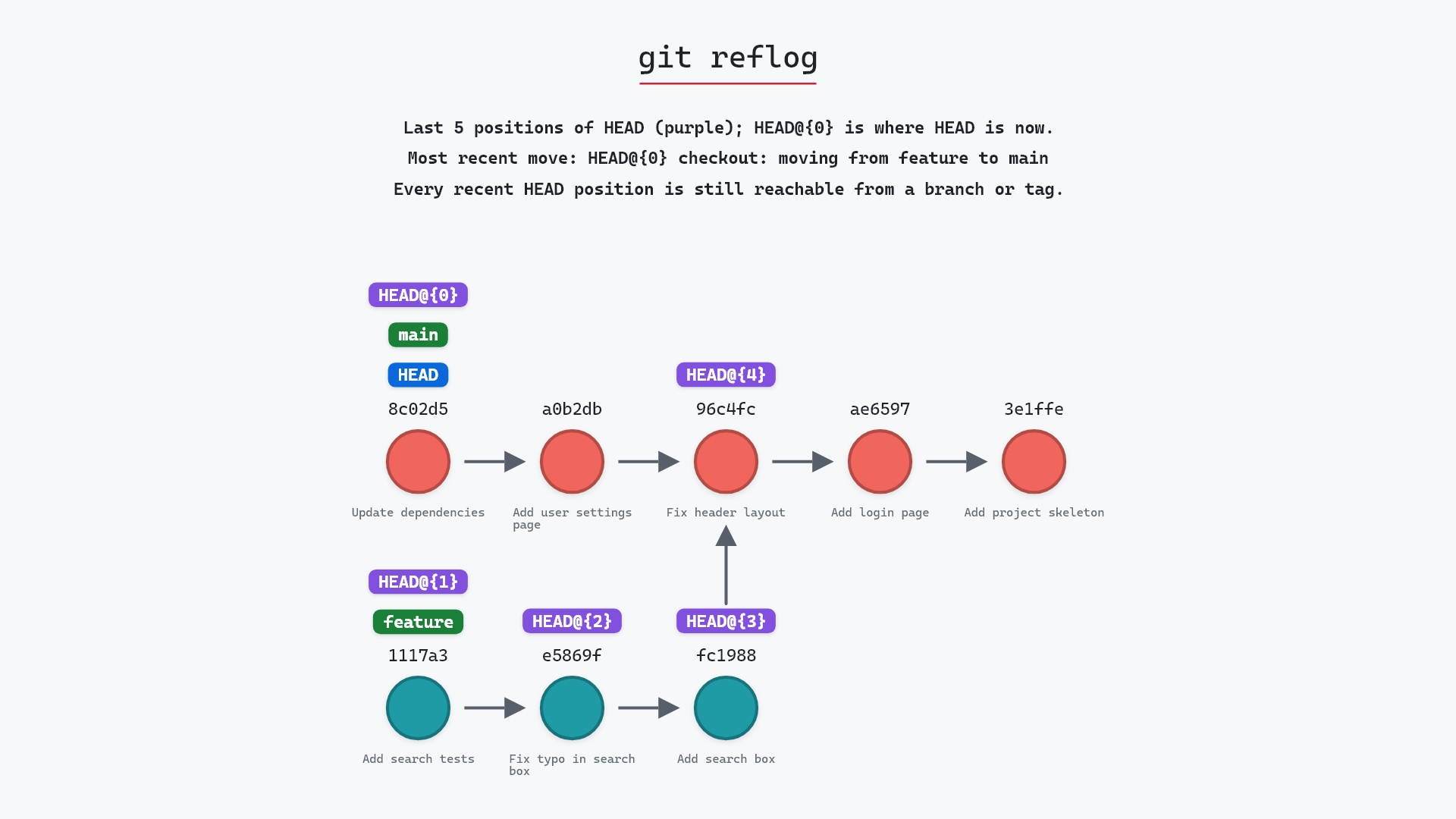
- git reflog, where the lost commits are remembered
- git rebase, the usual reason for a force push
- git commit --amend, the other usual reason
Get Git command tips by email, starting with git push --force.